Planning a container with one product in one carton size can start with a repeating layer pattern. Mixed cargo adds another class of problem: different sizes, weights and handling rules must fit together. Container loading software helps evaluate the arrangement before loading begins.
Illustration of the planning scenario, not a calculated or secured loading plan.In this guide
With a single SKU, a pattern may repeat. Work out one layer, check permitted orientations and stacking, then test how many approved layers fit. Dividing total container volume by carton volume is not enough to prove that arrangement.
With mixed cargo there is no pattern. The efficiency of the load depends on which items are placed first, which orientation each one takes, and which gaps the smaller items are used to fill. Change the order and the total changes. There are more possible arrangements than anyone can evaluate by eye, which is why experienced planners fall back on a safety margin and accept that some of the container is paid-for air.
Container loading software searches those arrangements instead of guessing at them.
What you are filling
Every plan starts from usable internal dimensions, not the external size in the container name. The following dimensions are illustrative planning inputs for comparing dry-container sizes. They are not specifications for a booked unit.
Here the high-cube example adds 300 mm of height over the 40-foot example while retaining the same floor area. That extra height adds a layer only if the packed cargo height and its stacking rules allow it. Confirm the actual internal dimensions, door opening, tare and payload with the carrier and the unit markings. Maximum payload is the permitted gross mass less the actual tare; volume alone does not determine it.
Container capacity and road-vehicle limits
The same cargo can produce different plans in a container and a trailer of similar size because the equipment and the constraints differ.
For the container, review payload, floor loading, load distribution, door clearance and securing requirements. For road transport, axle and coupling loads also depend on where the weight sits. A loaded container carried on a chassis still needs the road vehicle checks. A plan for one piece of equipment does not automatically validate another.
Rules travel with the product, not with the shipment
The rules that govern a load are properties of the goods. Ceramic tiles, insulation panels, appliances and drums each have their own limits. Keep the current packaging and handling data with the cargo record, and check the supported settings in your CargoTetris workspace before calculating.
The permitted load on top of an item is especially relevant to mixed cargo. It helps the planner avoid placing heavy units above packaging that cannot support them. The calculation does not replace packaging approval, cargo securing or inspection.
Building the plan
The workflow is short. Create a project, add the cargo, pick the container from the cargo spaces library or define a custom space, set the loading parameters, and calculate. Cargo lists can be imported from Excel with the supplied template, which is normally how a real order arrives anyway.
The result is a 3D layout shown step by step, together with space occupied as a percentage and in cubic metres, loading density and total cargo weight against the container limit. Loads that do not fit are visible immediately rather than discovered at the dock.
Correcting the layout by hand
A generated plan is a starting point. Stuffing crews work in a particular way, some goods have to be reachable at destination, and some customers want their items grouped together regardless of what that costs in fill rate.
The 3D scene supports manual cargo movement, with context-menu controls for rotation, stacking and removal. Use only movements permitted by the actual goods, then review the calculation and the loading crew's access.
Getting the plan out of the screen
The intended stuffing plan can be shared as PDF or Excel reports. Check that the report matches the final cargo list. It records the planned arrangement; it is not evidence that the container was physically loaded that way.
Keep the final cargo list and approved plan with the shipment record so a repeat order can be checked against the previous inputs.
A fair first test
Pick a mixed container you loaded recently, one where you were not sure everything would fit. Enter the cargo, run the calculation, and compare the fill rate with what actually went in.
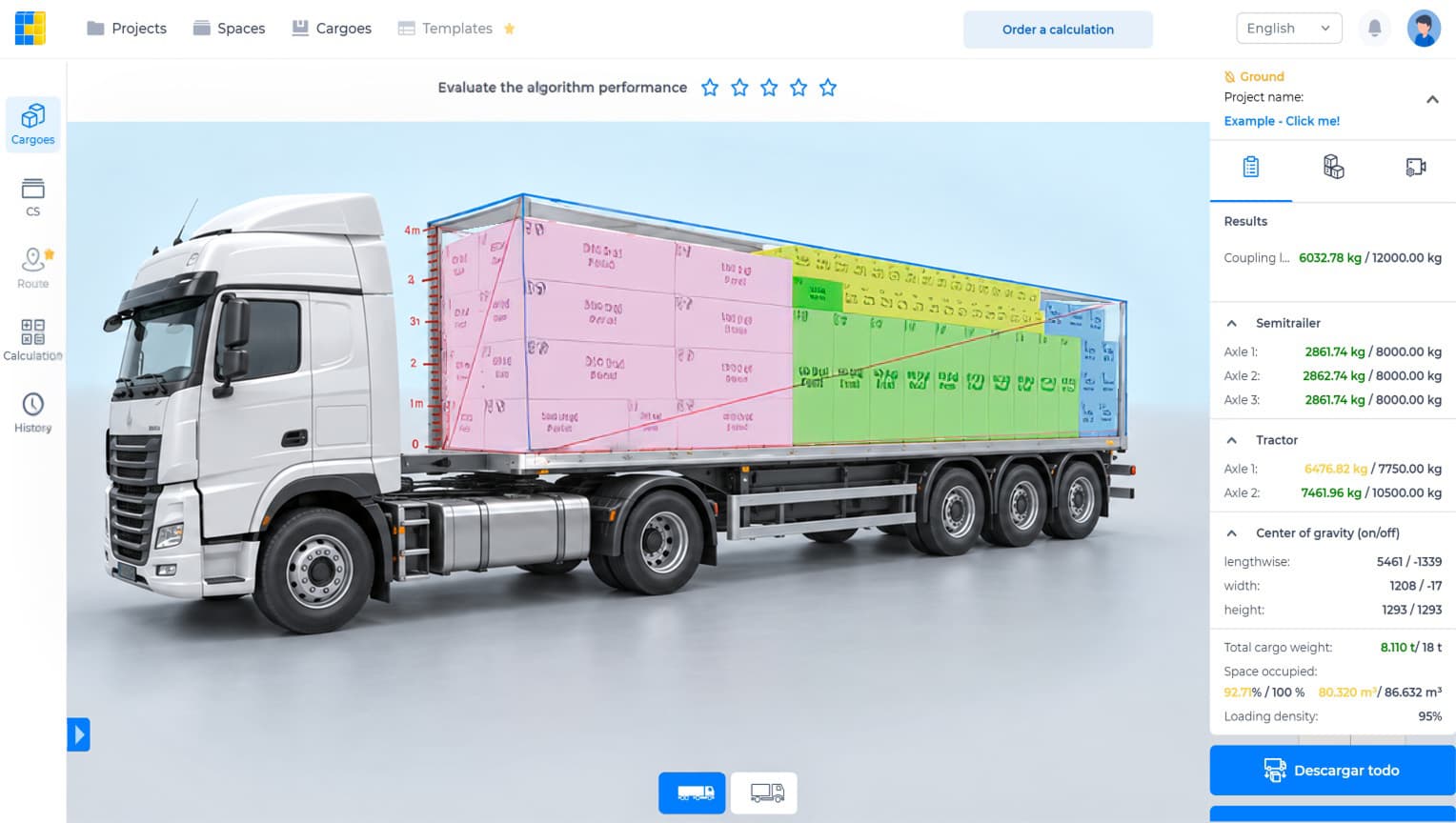
Actual CargoTetris product demonstration. This screen shows a truck load, not a calculation of the illustrative inputs in this article.
Watch the CargoTetris workflow
See the English product walkthrough, from cargo data to loading instructions. Duration: 7:52.
Start with your own cargo list
Create an account, enter a representative shipment and review the available planning workflow with your team.
Compare cargo volume with the actual container interior. Then check the door and placement, because a lower CBM total does not guarantee a workable load.
A container load calculation should show which items are placed, where they go and which rules the arrangement assumes. A CBM total answers only part of that task.