

25€
per month
1 User
For independent planners and small operations. Manage day-to-day loading calculations from one dedicated account.
Import an Excel file or add cargo dimensions, weight and quantity manually.
Set cargo space and loading constraints. Review placement, weight distribution and loading order.
Export PDF or Excel reports so your team can review and follow the loading plan.
Watch the complete workflow in English – from shipment data to loading instructions.
Create your account, add your cargo and choose a loading space.
All plans include Excel import, 3D load planning and PDF or Excel reports.
25€
per month
For independent planners and small operations. Manage day-to-day loading calculations from one dedicated account.
100€
per month
For logistics teams with several planners. Share the workload across up to five users and reduce reliance on one specialist.
150€
per month
For larger or multi-site teams. Give up to ten users direct access and standardize load planning across operations.
20€
per month
For independent planners and small operations. Manage day-to-day loading calculations from one dedicated account.
80€
per month
For logistics teams with several planners. Share the workload across up to five users and reduce reliance on one specialist.
120€
per month
For larger or multi-site teams. Give up to ten users direct access and standardize load planning across operations.
15€
per month
For independent planners and small operations. Manage day-to-day loading calculations from one dedicated account.
60€
per month
For logistics teams with several planners. Share the workload across up to five users and reduce reliance on one specialist.
90€
per month
For larger or multi-site teams. Give up to ten users direct access and standardize load planning across operations.
Six tailored implementations. Results reflect each company’s cargo, loading rules and workflow.
Hisense processes 50–70 truck and container loads per day. Shipment data from multiple distributors arrived in different formats, while every load plan had to follow compatibility rules for different appliance categories. The differences in source data slowed down transport planning and increased the risk of loading errors.
Implementation: 3 months
CargoTetris was adapted to Hisense's transport planning rules and product compatibility requirements. Shipment data from distributors was converted into a standardized format, and the system was integrated with the company's IT infrastructure. CargoTetris generated load plans according to a single set of rules and transferred the calculation results to connected systems.
Implementation: 3 months
Midea needed to automate vehicle loading for different appliance categories. Each load plan had to comply with compatibility rules between product groups, prevent damaging combinations and take routing requirements into account.
Implementation: 4 months
CargoTetris was configured with custom compatibility and placement algorithms for different appliance categories. During calculation, the system excluded prohibited combinations and selected a suitable position for each item. API integration with ERP and WMS automated the exchange of shipment data and load plans. Routing requirements were included when forming each load.
Implementation: 4 months
Saint-Gobain needed to optimize the loading of different construction materials during order formation. Each load had to maintain balanced weight distribution, comply with axle load limits and use available vehicle capacity.
Implementation: 5 months
CargoTetris was configured with loading algorithms for different material categories and integrated into the company's ordering system. As products were added to an order, the system calculated their placement, weight distribution, axle loads and remaining vehicle capacity. Distributors could see which additional products could be included while maintaining a feasible load plan.
Implementation: 5 months
EGGER needed to synchronize load planning with its weighbridge system. The process had to identify each arriving vehicle, determine its type, dimensions and capacity, assign the correct shipments and apply product-specific loading rules across five plants.
Implementation: 5 months
CargoTetris was connected to the weighbridge infrastructure through integration gateways. License plate recognition identified arriving vehicles and linked them to planned shipments. Custom loading algorithms accounted for cargo type and weight, while routing logic prioritized loading across five production sites.
Implementation: 5 months
ROCKWOOL used product-specific loading rules based on the experience of planners at different facilities. The rules had to account for product orientation, density, compressibility, geometry, stacking restrictions and protection from crushing. Distributors also needed access to the same calculation logic when preparing shipments.
Implementation: 5 months
CargoTetris converted these operational rules into algorithms for each product group. The system calculated lengthwise or crosswise placement, horizontal, on-edge or end positioning, inner diameter, wall thickness and compressibility. Multi-level loading supported pallets placed on pallets and cargo placed above palletized goods. The calculation engine was integrated into the distributor ordering workflow.
Implementation: 5 months
REHAU needed to optimize loads containing different construction materials. Each load plan had to prevent uneven weight distribution and axle overload while using available vehicle capacity.
Implementation: 5 months
CargoTetris was configured with custom loading algorithms for different material categories and integrated into the company's ordering system. As an order was assembled, the system calculated cargo placement, weight distribution, axle loads and remaining vehicle capacity. Additional products could be included while maintaining a feasible load plan.
Implementation: 5 months
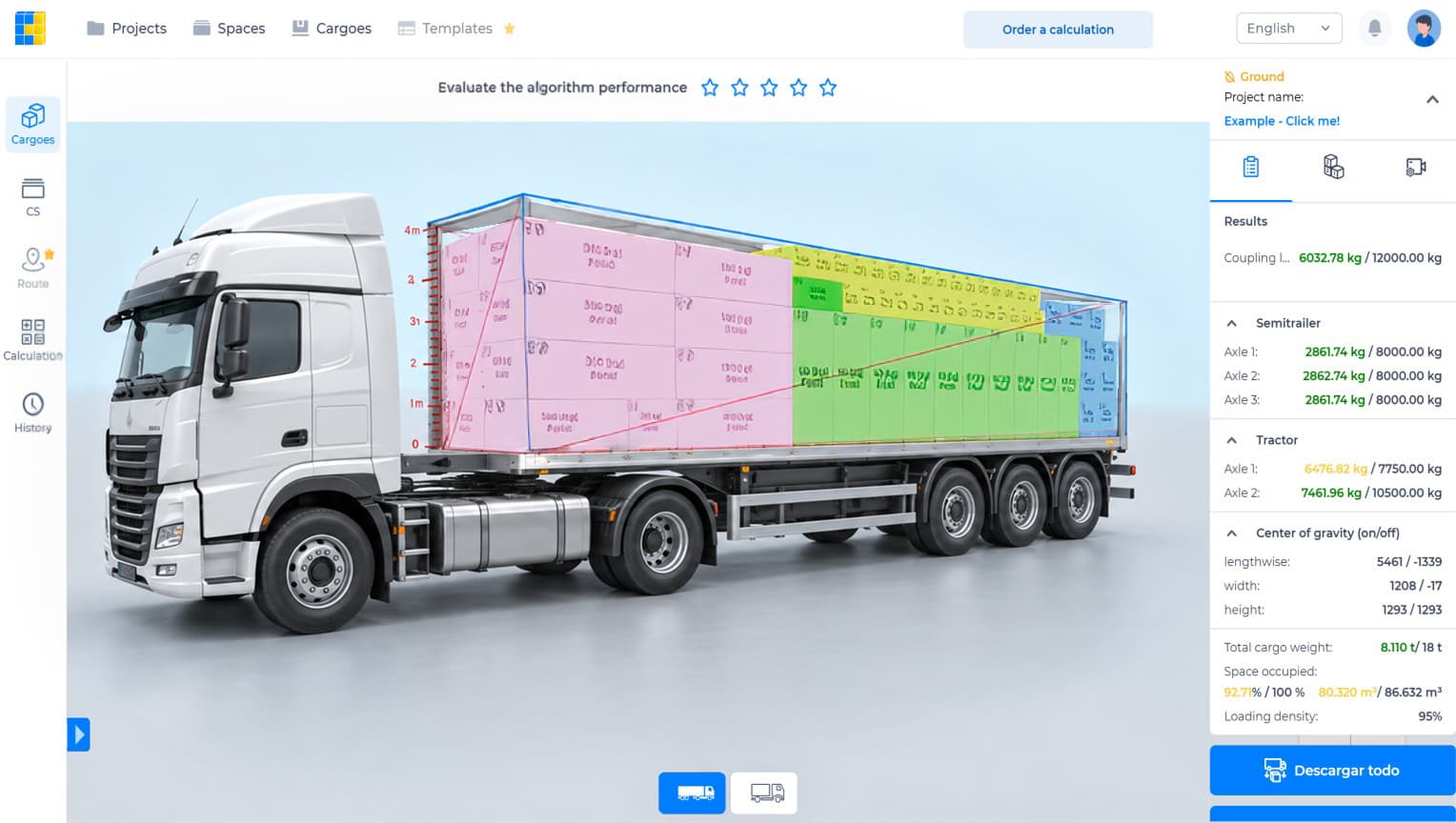
CargoTetris is a smart virtual loading service that helps you accurately plan the placement of pallets and boxes within any of the available types of cargo spaces.
After logging in, the calculation page will appear on the screen.
Work in the program begins by selecting the cargo space – this could be a vehicle, container, or pallet. You can choose a cargo space from the list or enter its dimensions manually.
Then, add the cargo. You can select cargo from a previously saved list, manually enter the dimensions, or import cargo from a CSV file.
The system will then display the optimal cargo arrangement on the visualization.
Yes, the system considers the axle load.
Tell us what you ship, which vehicles you use and what you want to improve. We’ll review your requirements and contact you to discuss the right CargoTetris setup.
CargoTetris can be configured for your loading rules, weight and axle limits, loading sequence, reports and interface language, with ERP and WMS integration.
contact@cargotetris.com